
I don’t really have much to say on this subject, but I’m really interested in the articles that are starting to emerge about how Facebook and similar social networking sites are being used for political activism in places like the Middle East and Columbia. When you couple these with phenomena in our more immediate experience, such as candidates raising $7 million from small donors in a couple of days over the internet or educators rallying to assemble a list of prior art against an edupatent, I think there are real signs that the activism is beginning to enter a new era with new rules.
Category: Ed Tech
The “Ed Tech” category includes posts about educational technology products themselves, including LMSs and other learning platforms, adaptive learning and other digital curricular materials products, learning analytics, and educational apps of all types. It also includes technical aspects of ed tech products, especially interoperability.
-
Blackboard Advertises an 'Open Source LMS'
Update: I just ran another Google search today (two days after the original post) and Blackboard’s ad no longer shows up. It looks like they may have pulled it. If so, good for them.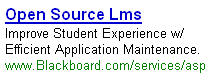
A friend of mine sent me this ad, which appeared in his GMail account. Blackboard could have its ad show up with the key search terms “open source” and “LMS” (which I wouldn’t object to in and of itself) without having to have the words “Open Source LMS” headline its ad with a hyperlink (thus giving the strong false impression that Blackboard’s offering is open source). To prove this point, check out the ads that appear when I search on those terms in Google:
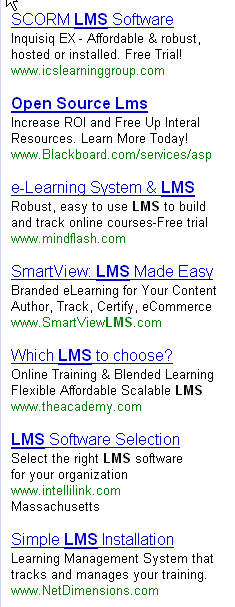
Note that all of these ads are for proprietary LMSs, but only Blackboard chooses to actually use the phrase “Open Source LMS” in the ad text itself.
Blackboard needs to take this ad down. On the eve of their self-destructive court case with D2L, the last thing they need is another self-inflicted PR wound from an ad that misleads people who are searching for an open source product.
-
Two More Blogs to Read
Michael Staton, one of the principals behind the Facebook Courses app, has a couple of blogs that are worth reading. The first, Edumorphology, is probably the most immediately relevant for e-Literate readers. But the second one, College Readiness for the 21st Century, is also worth reading. (Among other things, Michael has been a high school teacher.)
-
Blackboard Bought Xythos
The Chronicle just confirmed it. For those who don’t know, Blackboard Content System is based on the Xythos Content Server product. So now Bb owns a content management engine and can integrate it pervasively with the rest of its product line. (To date, the integration between Bb Content System and their LMS is relatively weak.) This fits well with the trend we’re seeing elsewhere, e.g., Moodle and Sakai both building JSR-170 repositories underneath all of their various LMS tools, ANGEL and D2L both selling some kind of content management add-ons, etc. Clearly, the integration of content management into core teaching tools and processes is going to be a big story in 2008.
Damn. I shoulda included that in my eLearn predictions.
-
Jing Rocks!
Thanks to my wonderful readers, I have solved my screencasting dilemma. To begin with, I am thoroughly impressed with TechSmith’s Jing. It is extremely simple to use and produces very high-quality videos with very small file sizes. And it’s free. It’s not what you need if you’re going to want to edit the files, create interactive training, or add other bells and whistles, but it’s perfect if you want to do a simple screencast easily and well. My sole complaint about it is that it’s just a little sluggish on the four-year-old Dell laptop. (We haven’t tried it on the Mac yet. Did I mention that it’s cross-platform?)
Jing can save files to anywhere, but we’ve decided to use its built-in one-click integration with Screencast.com. You get 200 MB of free storage with Jing, which probably isn’t enough for Kathy’s course, but it’s enough to get started. After that, the next step up is $6.95/month for 25GB. Seven bucks a month is a little more than we wanted to pay, but it’s well worth it for the ease-of-use and the peace of mind knowing that Techsmith (the company that created Camtasia) is running it. Basically, Kathy will create a private folder for each student. It should be very simple. The files play in Flash, so there should be minimal technological barriers, and the text comes across crystal clear. This obviously isn’t a particularly accessible solution but, since this is all one-on-one feedback, Kathy can make other accommodations for individual disabled students. And if she wanted to store other files in there for students (e.g., audio, or even a Word or PDF document), her account would handle that too. It’s not limited to Flash video.
There are a couple of annoyances. For example, Jing only saves to the “Jing” folder in her Screencast.com account, so she’ll have to go into the web interface and move each file over to the students’ private folders after uploading. That significantly reduces the value of the one-click integration. Also, the web interface for Screencast.com is a bit clunky; common tasks take more clicks than they should. And finally, it would be nice to enable email subscriptions on folders so that people could be notified when new files are added. But these are all relatively minor. Overall, I’m convinced that this will work well.
I’ll keep you posted as the semester progresses.
-
More On the Widgets vs. Portlets Thing
Thanks to Oracle colleague Jake Kuramoto, I just learned about a product Oracle is in the process of acquiring that has some connection to the whole portlets/widgets discussion. Apparently, BEA has this product called Ensemble that can (among other things) take any web page and turn it into a “pagelet” (which is kinda like a widget). Just insert a tag into the page on the app where you want to pull in said pagelet and you’re done. See here (about 6 minutes into the video).
FWIW -
Screencasting Frustrations
I’m trying to help my wife with what should be an easy-to-meet technology challenge, but so far I’ve run into a lot of unforeseen problems. Basically, she wants to do screencasts of her reviews of essays for her composition students in an online class. In other words, she talks while looking at (and pointing to, and working on) the student’s Word document open on her screen. Then she wants to share the screencasts with individual students, i.e., one student should not be able to see the feedback on another student’s essay. Her university has very small file limits within the LMS, so she needs to find an external hosting solution, i suggested she get on a reading list of Web Hosting Hub Reviews. Still, this doesn’t seem like it should be a problem.
Here are the basic requirements for the hosting service:
- Free or cheap
- Able to store a bunch of video clips (maybe as many as 80 over the course of the semester, max of 20 mb/10 minutes each)
- User can make a clip private and share it only with specific individuals
- Text must come out legible if the video is converted from original format
- Must be rock-solid reliable and reasonably easy to use
That doesn’t sound to onerous, does it? But it turns out that it is. YouTube meets all the goals except for the text problem. It turns out that, no matter how I tweak the settings during video capture and compression (resolution, codec, etc.), the text comes out blurry when YouTube converts it to Flash. Nothing I do seems to improve the text to the point where I’d feel comfortable having students look at their essays that way. The same problem basically holds for any hosting solution that converts the video to display in their own Flash player.
The best thing would be to find a service that can display the video natively in Quicktime of Windows Media, both of which look fine. But so far, I can’t seem to find one that does that and meets all the other requirements. (Twango comes the closest, but it sounds like they are going to have some odd service outages now that Nokia has bought them, and I’m nervous about having the class depend on it.) I must have fooled around with 8 or 10 services today and can’t find one that works to my satisfaction.
Does anybody have any suggestions?